


Zoho Books - Accounting App
4.6519.00 Reviews
App Specs
- Version
- 6.3.37
- Updated On
- License
- Free
- Downloads
- 5,000,000+
- Developer
- Zoho Corporation
- Categories
- Business
- Platform
- Android, iOS
Screenshots

 Analysis by AppCompare
When I look at a mobile accounting app, I care less about how many charts it can display and more about whether I can keep records tidy during a busy day, then make sense of them later. Zoho Books is built for that small-business rhythm: capture routine activity as it happens, keep invoices and expenses organized, and use the resulting picture to make practical decisions. It is a business app from Zoho Corporation, and its focus feels most useful for owners who want to handle everyday bookkeeping themselves rather than treating accounting as a task reserved for month-end.
A sensible place to begin
The first decision is not which button to tap; it is how you want your business records organized. Before entering a stack of transactions, I would take a little time to set up the business profile and make sure the customer and item details you expect to reuse are entered consistently. That small bit of preparation pays off: invoices are quicker to prepare, and names are less likely to appear in slightly different forms across records.
My preferred baseline routine is simple. Create an invoice when the work is ready to bill, record a business expense while the receipt is still in hand, and take a short look at the dashboard before making a spending decision. That is more dependable than trying to remember several days of activity in one sitting. The app’s value is not just that it puts accounting tools on a phone; it can help turn bookkeeping into a repeatable habit instead of a stressful catch-up job.
A realistic example is a freelance designer finishing a client project while away from a desk. They can prepare an invoice on the phone, use the client details already on file, and keep the billing task moving rather than postponing it until they get home. After buying materials or paying for travel, they can photograph the receipt and categorize the expense. Later, the records give them a more useful basis for checking how the project affected cash flow than a collection of unreadable paper slips would.
Settings that earn their keep
Invoice customization is worth approaching as a practical choice, not a decorating exercise. I would make the business identity and the wording clear first, then avoid changing the layout for every individual bill. A consistent invoice is easier for clients to recognize and easier for the owner to review. Once the basic format feels right, saved customer and item information can reduce repetitive typing without making the paperwork feel impersonal.
Expense categories deserve similar attention. A receipt photo is useful, but a photo by itself does not explain what the purchase was for. Choosing a sensible category at the time of entry helps reports tell a coherent story later. If a purchase could fit more than one category, consistency matters more than inventing a perfect label for each transaction. I would settle on a straightforward approach and apply it the same way from one month to the next.
For businesses that bill clients in different currencies, the app’s multi-currency support can make the workflow less awkward by handling exchange-rate calculations. I would still review the resulting entries rather than assuming that currency support removes every bookkeeping judgment. International work can involve details that depend on the business’s own accounting practices, so the app is a helpful record-keeping tool, not a substitute for knowing how a particular transaction should be treated.
Worth Reading Before You Choose

EA SPORTS FC Mobile 26 Is a Bigger Football Game, but It Takes Time

Flipboard Shows What News Apps Must Do Beyond the Feed

Switching to Android Auto Means Rethinking Your Driving Routine

Google Calendar Makes a Crowded Week Easier to Manage

Ludo King Makes the Most of the Minutes Between Plans

Baby Panda World Brings Quick Play to Modern Phones, but Its Game Library Feels Busy
Shortcuts that come from routine
The quickest users are not necessarily the ones tapping fastest; they are the ones who avoid entering the same information repeatedly. Keeping client and item details consistent, using a stable invoice format, and recording expenses soon after purchase all reduce small points of friction. These are modest habits, but they make mobile bookkeeping feel manageable even when the owner is moving between client work, deliveries, and administrative tasks.
I also find it useful to separate capture from review. During a busy day, the goal can simply be to create a clear record and attach the receipt. At a quieter moment, the owner can review the reports and dashboard with enough attention to notice changes. Trying to interpret every transaction the instant it is entered can interrupt work; leaving every review until the end of a long period risks overlooking a problem while it is still easy to address.
The reporting tools are most useful when you approach them with a question. For instance, a business owner might check a profit and loss report to see whether costs are rising, or look at cash flow before committing to a purchase. The dashboard offers a quicker overview, while detailed reports are better for investigating what sits behind a trend. Neither view makes a decision automatically, but together they can help an owner move from “How are things going?” to “Which part should I look into?”
Where it fits—and where it may not
Compared with a basic spreadsheet, Zoho Books offers a more connected place to handle invoices, expense records, and financial reports. A spreadsheet may still be the better choice for someone with very few transactions, an unusual custom process, or no desire to learn accounting software. But once a business is repeatedly creating bills and sorting receipts, a structured app can reduce the burden of keeping separate files in sync.
Compared with desktop-first accounting, the mobile approach is especially handy for capturing information away from a desk and checking the business at a glance. It is not automatically the best fit for every complicated accounting task, though. A business with specialized reporting needs, extensive approval procedures, or bookkeeping managed by an accountant through a different established system should compare workflows before switching. The important question is whether the app’s routine matches the way the business actually records and reviews its money.
There is also a learning curve beneath the friendly surface. Invoicing and receipt capture are approachable, but accounting reports become more useful when the owner understands what each one is meant to answer. If financial records feel unfamiliar, I would start with a small number of consistent tasks and learn the reports gradually rather than trying to interpret everything at once. For complex tax or accounting decisions, getting professional guidance is wiser than treating any app as an authority.
Who will get the most from it
I would put Zoho Books on the shortlist for freelancers and small-business owners who want invoices, expenses, and business reports in one mobile workflow. It is particularly appealing to someone who travels, meets clients away from the office, or often receives receipts when there is no convenient time to sit down at a computer. A business that works with international clients may also appreciate the multi-currency support, while still taking care to review its own accounting treatment.
I would be more cautious if you only need a place to jot down occasional income, if a spreadsheet already handles your simple records comfortably, or if you expect a phone app to make accounting choices for you. It is also worth checking whether the features and plan available to your business suit your needs before building a workflow around them. The app is free to download, while in-app purchases range from about one dollar to around $275 per item, so it is sensible to understand any purchase that applies to your intended use.
Practical details before you start
Zoho Books is rated for everyone and has a 4.6 average from around 27,000 ratings, with more than 1 million installs. It first appeared on January 3, 2014, and version 6.3.28 supports devices running Android 8.0 or later. Those details make it a well-established option to consider, but they do not replace a more personal check: confirm that the app suits your device and that the way it handles your business’s records fits your working habits.
One question owners often have is whether they can do everything from the phone. The mobile app is useful for common tasks and quick checks, and it syncs with the web version, so it can be part of a broader workflow rather than a device-only system. For detailed review or longer sessions, I would still choose the screen and working style that let me concentrate. Being able to act on the go is valuable; forcing every task onto a small display is not.
Another practical question is whether reports are suitable for handing over to an accountant. They can help you understand and organize business activity, but I would agree with your accountant on the records and format they need rather than assuming a report alone covers every requirement. Likewise, receipt photos help keep supporting information close to an expense, but a good habit still matters: make sure the image is readable and the category makes sense before moving on.
How the day-to-day experience holds up
I find the day-to-day experience most useful when I treat the phone as a place to capture and check, not as a reason to rush through bookkeeping. A quick pause to verify an expense category or invoice detail can prevent small inconsistencies from spreading into later reports. That balance—moving routine work along while saving judgment calls for a calmer moment—sets up the practical choices worth considering next.
Getting Down to Business
Once you're in, you’ll find that Zoho Books is packed with all the essential tools you need to keep your finances in check. Creating invoices is a cinch—just a few taps and you can send professional-looking invoices to your clients. Plus, you can customize them to fit your brand style, which is a nice touch.
The app also offers a robust set of features for expense tracking. You can easily snap photos of your receipts and categorize them right on the spot. It’s like having a mini accountant in your pocket, ensuring you never lose track of where your money is going.
Keeping Tabs on Everything
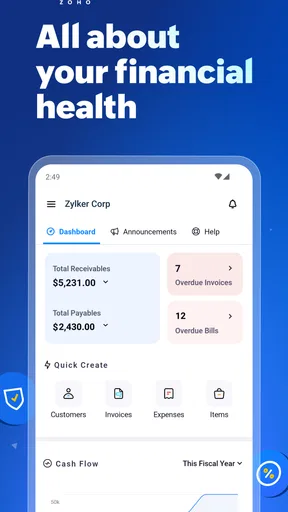
What really impressed me was the reporting capabilities of Zoho Books. With just a few taps, you can generate detailed reports that give you a clear picture of your business's financial health. Whether it's cash flow statements, profit and loss reports, or balance sheets, Zoho Books has got you covered.
And let's not forget about the dashboard. It gives you a quick overview of your financial position, with charts and graphs that make complex data easily digestible. I found it particularly handy for making quick business decisions without diving into the nitty-gritty details.
On-the-Go Convenience
One of the standout features of Zoho Books is its mobile app. As someone who’s always on the move, I loved how I could manage my accounting tasks anytime, anywhere. The mobile app syncs seamlessly with the web version, so you’re always up-to-date regardless of the device you’re using.
Furthermore, the app supports multiple currencies, which is a lifesaver if you’re dealing with international clients. It automatically calculates exchange rates, saving you the hassle of manual conversions. This is a game-changer for global business operations.
Security and Support
I know security is a big deal, and Zoho Books doesn’t skimp in this department. The app uses encryption and secure protocols to keep your data safe. Plus, regular backups ensure that your financial information is always protected.
And if you ever find yourself stuck, Zoho Books offers solid customer support. Whether it’s through their comprehensive help center or direct contact options, getting assistance is straightforward and convenient. I found their support team to be responsive and knowledgeable, which is always a plus.
Wrapping Up My Experience
All in all, Zoho Books is a fantastic choice for those looking to streamline their accounting processes. It’s user-friendly, feature-rich, and offers flexibility for businesses of all sizes. Whether you’re a freelancer or a small business owner, Zoho Books has the tools to help you stay on top of your finances without the stress.
If you’re ready to take your accounting game to the next level, I’d suggest giving Zoho Books a try. It might just be the financial partner you’ve been looking for!
Pros
- User-friendly interface for easy navigation.
- Comprehensive reporting and analytics tools.
- Seamless integration with other Zoho apps.
- Automated workflows save time and effort.
- Multi-currency support for global business.
Cons
- Limited customization for invoice templates.
- Mobile app missing some desktop features.
- No free plan after trial period ends.
- Lacks integration with some third-party apps.
- Customer support can be slow to respond.
FAQs for Zoho Books - Accounting App
What features does Zoho Books offer for small businesses?
Zoho Books provides a comprehensive suite of features tailored for small businesses, including invoicing, expense tracking, and inventory management. It also offers bank reconciliation, financial reporting, and project management tools. The app integrates with other Zoho products and various third-party applications, making it a versatile choice for business owners seeking a unified accounting solution.
Is Zoho Books suitable for freelancers and independent contractors?
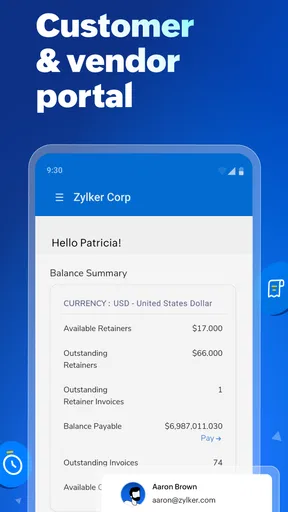
Yes, Zoho Books is well-suited for freelancers and independent contractors. It offers features like time tracking, client portals, and customizable invoices that cater to the needs of individuals managing their own businesses. Its user-friendly interface ensures that even those with limited accounting knowledge can easily navigate the app and manage their finances effectively.
How secure is my financial data on Zoho Books?
Zoho Books prioritizes the security and privacy of your financial data. It employs advanced encryption methods and secure data centers to protect information from unauthorized access. The app also offers multi-factor authentication and regular security audits. Users can rest assured that their data is well-protected while using Zoho Books.
Can Zoho Books handle multi-currency transactions?
Yes, Zoho Books supports multi-currency transactions, making it an ideal choice for businesses operating globally. The app allows users to send invoices and accept payments in different currencies, automatically updating exchange rates. This feature ensures accurate financial reporting and simplifies accounting for businesses dealing with international clients.
Does Zoho Books offer any customer support?
Zoho Books provides robust customer support through multiple channels, including email, phone, and live chat. They also offer a comprehensive help center with articles, tutorials, and community forums. Users can access support for technical issues, get assistance with setup, and receive guidance on utilizing the app’s features to their fullest potential.


